> ## Documentation Index
> Fetch the complete documentation index at: https://novu-c5de82d9-inbox-rendering-redesign.mintlify.site/llms.txt
> Use this file to discover all available pages before exploring further.
# Managed Agent Overview - Novu Connect
> Managed agents run on Claude (or another connector) without a bridge server. Configure prompt, tools, MCP, and skills in the dashboard.
Agents are currently in private beta. Please contact us at [support@novu.co](mailto:support@novu.co) to get access.
A managed agent lets you connect an AI platform like Claude directly to your Novu agent. The platform handles the reasoning, planning, and tool use. You configure credentials and a system prompt in the Novu dashboard, connect a chat provider like Slack, and the agent is ready to talk to your users. No bridge application or handler code is required.
 ## How it works
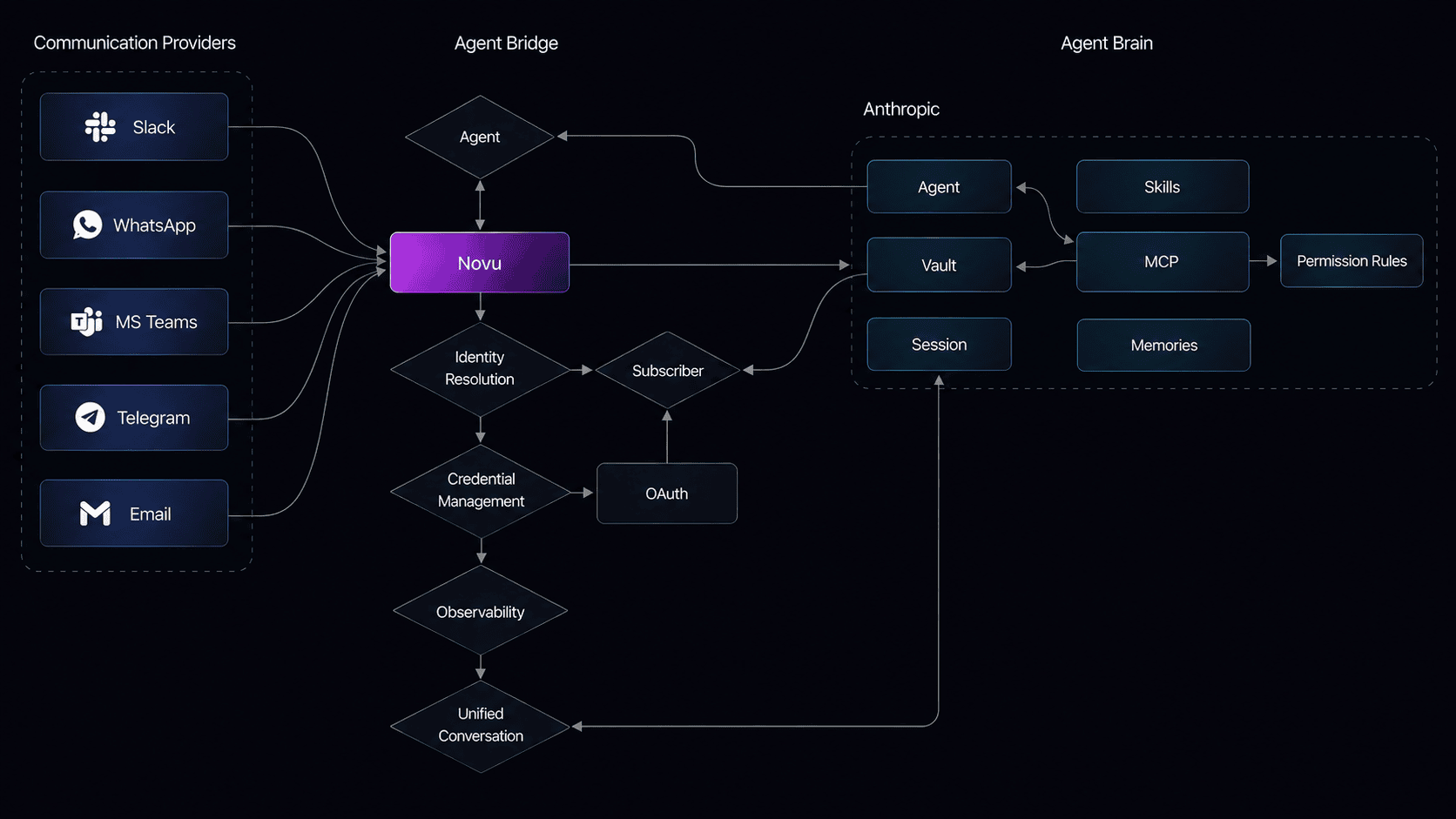
1. A user sends a message on a connected provider (Slack, Microsoft Teams, email, etc.).
2. Novu receives the message, resolves identity and conversation state, and forwards the full context to the AI platform.
3. The platform processes the message using its built-in tools (bash, file operations, web search, grep, etc.), any MCP servers you enabled, and any custom skills you uploaded.
4. Novu delivers the response back to the same thread on the provider.
You do not write event handlers or deploy a bridge server. The AI platform is your agent logic.
## What you configure
Setting up a managed agent involves five pieces, all configured from the Novu dashboard:
* **Connector**: the AI platform that powers the agent (Claude or AWS Claude today; OpenAI and AWS Bedrock AgentCore coming soon). You provide API credentials or use Novu demo credentials to start.
* **System prompt**: instructions that tell the agent who it is, how to respond, and what to avoid.
* **Built-in tools**: bash, file read/write/edit, glob, grep, web search, and web fetch are provided by the platform and available out of the box.
* **MCP servers**: external integrations like Linear, GitHub, Slack, and Notion that you enable from the dashboard. Some require end-user OAuth authorization.
* **Custom skills**: SKILL.md instruction files you upload from a GitHub URL or paste inline to teach the agent domain-specific workflows.
For a full breakdown of each component, see [Concepts](/agents/managed-agent/concepts).
## When to use a managed agent
Managed agents are a good fit when you want to get an agent running quickly without writing backend code. The platform handles tool calls, streaming, and chain-of-thought reasoning for you.
If you need full control over the agent logic, want to call your own APIs directly in handlers, or need complex multi-step business flows, [connect a custom code agent](/agents/get-started/ai-sdk) instead.
## Next steps
Anthropic Claude managed agent + Slack.
Claude Platform on AWS + Slack.
Connectors, built-in tools, MCP servers, skills, and conversation flow in detail.
Enable external tools for your managed agent.
Upload custom skills to teach the agent new workflows.
Slack capabilities and setup links.
Create, configure, and manage managed agents programmatically.
## How it works
1. A user sends a message on a connected provider (Slack, Microsoft Teams, email, etc.).
2. Novu receives the message, resolves identity and conversation state, and forwards the full context to the AI platform.
3. The platform processes the message using its built-in tools (bash, file operations, web search, grep, etc.), any MCP servers you enabled, and any custom skills you uploaded.
4. Novu delivers the response back to the same thread on the provider.
You do not write event handlers or deploy a bridge server. The AI platform is your agent logic.
## What you configure
Setting up a managed agent involves five pieces, all configured from the Novu dashboard:
* **Connector**: the AI platform that powers the agent (Claude or AWS Claude today; OpenAI and AWS Bedrock AgentCore coming soon). You provide API credentials or use Novu demo credentials to start.
* **System prompt**: instructions that tell the agent who it is, how to respond, and what to avoid.
* **Built-in tools**: bash, file read/write/edit, glob, grep, web search, and web fetch are provided by the platform and available out of the box.
* **MCP servers**: external integrations like Linear, GitHub, Slack, and Notion that you enable from the dashboard. Some require end-user OAuth authorization.
* **Custom skills**: SKILL.md instruction files you upload from a GitHub URL or paste inline to teach the agent domain-specific workflows.
For a full breakdown of each component, see [Concepts](/agents/managed-agent/concepts).
## When to use a managed agent
Managed agents are a good fit when you want to get an agent running quickly without writing backend code. The platform handles tool calls, streaming, and chain-of-thought reasoning for you.
If you need full control over the agent logic, want to call your own APIs directly in handlers, or need complex multi-step business flows, [connect a custom code agent](/agents/get-started/ai-sdk) instead.
## Next steps
Anthropic Claude managed agent + Slack.
Claude Platform on AWS + Slack.
Connectors, built-in tools, MCP servers, skills, and conversation flow in detail.
Enable external tools for your managed agent.
Upload custom skills to teach the agent new workflows.
Slack capabilities and setup links.
Create, configure, and manage managed agents programmatically.